CLICK HERE FOR THOUSANDS OF FREE BLOGGER TEMPLATES »
"There are some things which words cant express,for everything else there is hisam onomics"
Showing posts with label firefox. Show all posts

Saturday, September 13, 2008

Using firefox hisam shtyle .

I know i'm no firefox geek, and i also know that i have not enjoyed using any piece of software as much as i have enjoyed using firefox.

I have my own style when it comes to using firefox (no copyrights) , just have a look and see if its of any help to you.

My main playground is the "bookmarks" , because i find this to be the most usefull and interesting feature on firefox. And with the tremendous improvement in the "bookmarks" with Firefox 3 has made things a lot more easier and interesting for me.

So let me start with the keyword trick that is associated with every bookmark you save on your firefox.
This is how it works >>>>

Go to tools > Organize bookmarks and then select a bookmark, you will then see the properties of that particular bookmark at the bottom >> like this
Name:
location:
Tags:

and then a "more" button, clicking on that will get you 2 more options, namely keyword and description. We dont have anything to do with description.

enter something as a keyword matching that particular bookmark.
For instance i have "t" for timesofindia.com , "O" for orkut.com and so on.

And after entering a keyword, click the less button below.

Now what you can do is just enter that keyword on the adress bar and press enter to get that particular bookmarked site.
i.e when i enter "O" in the address bar and press enter, i'm taken to orkut.

Similarly have keywords to most of your frequently visited pages.
Like i have a keyword for each of my owned communities on orkut.
Damn useful it is.


The second trick being, quick searches which i have already mentioned in one of my previous post, read it here


The third trick allows me to have my bookmarks synchronised automaticaly in all the firefox installations that i use >>>on a firefox on my desktop, 2 on my lappy ( one in linux and another one in XP). The answer is a firefox extension called Fomarks.
This is what foxmarks has got to boast about itself >>>

"If you use Firefox on more than one computer, you'll want Foxmarks. Install Foxmarks on each computer, and it will work silently in the background to keep your bookmarks synchronized. You can also log in to my.foxmarks.com to manage your bookmarks from any computer."

One awesome extension, especially if you are a bookmarking freak and use a lot of computer systems. And if you are one, i will be surprised if you havent googled it yet. Anyhow here is the foxmarks link


Hope that was of some help to someone somewhere.

Chillax. ( ? ? ? CHILL+RELAX )

read full !

Wednesday, September 03, 2008

Firefox vs Chrome on my Celeron M.

Ever since i downed Chrome and installed it on my Celeron M lappy, i have been worried for that firefox shortcut on my desktop. But once i started using Chrome, that worry seemed non existant. Know why below...

+ the main reason being simple, Chrome takes more memory. Each tab opens as a new process/thread which my poor Celeron M cant afford.
Ya it can have its positive effects, say when a tab hangs/crashes it doesnt effect other open tabs since they all are different process/threads.
Read this Google on Google Chrome - comic book to get a better idea.

+ And when the actual browsing speed is concerned, its a lot slower than my ff3. I did a speed testing with both the browser loading "hisamonomics" and did a split watch

It took 18.90 secs for Chrome to show the first signs of hisamonomics (read title) and the second split was when "hisamonomis" would completely load. I waited.......waited and finally stopped the watch when it was 05:01.01. Yup 5 minutes. And it was not complete even then. I told you i stopped out of frustration.

Now compare this with Firefox. 09.54 secs for initial signs of hisamonomics (read title again) and when the stop watch read 01:04.13, hisamonmics was all ready.

Firefox a clear winner here.

+ No signs of any thing like extensions on Chrome. And you must know that i can hardly breathe without em.

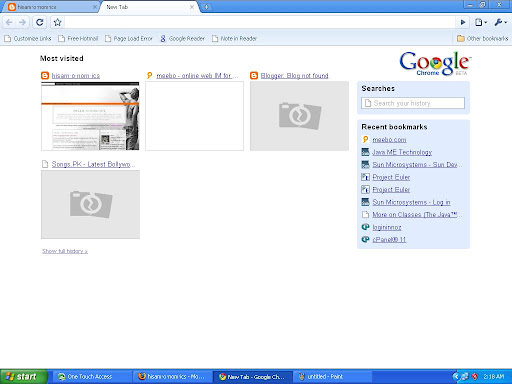
+ A new tab in chrome shows your most visited sites in fast dial mode. Coool, ehhh?? an extension called fast dial does ditto for you on firefox.


The below screenshot shows the new tab for my chrome. The most visited sites being shown as a fast dial and your recent bookmarks shown on the right side.


-Incognito mode. Yup thats one area Chrome has caught firefox unaware. But by the next ff release that should be easily overcome. For those unaware, Incognito mode lets users create an "incognito" window where "nothing that occurs in that window is ever logged onto your computer."
This is a read-only feature with access to one's bookmarks or favorite sites.

+ all my favourite firefox shortcuts are intact on Chrome which shows that google has adopted the firefox kernel and tried to better it from thee. :-)


All in all i feel Chrome is out just to cut out Microsft I.E's market share and for google to have more control over how its internet applications work. Also just heard that it will be possible to have Gmail on an offline mode in Chrome with the Google gears functionality being added to Chrome.

For now i'm happy with my darling firefox 3 and its cool extensions. Lets see what Chrome has to offer in the future. Till then Firefox,Me and the world.


read full !

Tuesday, September 02, 2008

Why do google need Chrome ?

I was surprised to read that google is coming out with its own browser named "chrome".
But why?? that is the quetsion i just fail to get an answer for.

why google wants a browser of its own , when they have been funding Firefox almost single handedly ??

The most satisfying answer that i got was from the Mozilla's Europe president, Tristan Nitot (of course i googled that), this is what he had to say --->>>

"Mozilla's Europe president, Tristan Nitot also chimed in during an interview with PCPro, stating that they don't view this as a direct attack on Firefox, even if it did catch them by surprise. "I'll take another example: just before Microsoft launched Vista, it invited us [to work with it] so that Firefox works better on Windows Vista. Because for it, Firefox being a top-tier application that was very successful - we now have 200 million users around the world - it could not afford to have Firefox run slowly on Vista. Therefore, it helped us improve Firefox for Vista. That's just the same for Google. It wants Firefox to perform well with its applications, that's for sure. Indeed, it even wants IE to perform well with Gmail and the rest. It's just that it has very limited control over this. That's why Google's been frustrated and it is launching this Chrome browser."


And from whatever little i have read, i get a feeling that CHROME is a place that google wants its users to reach for the maximum utilisation of its products or apps. And i have already started feeling that its going to be another master stroke from the masters of the internet. And now i get reminded of the problems that i have with gmail in firefox, small but annoying at times especially with a slow connection.
Maybe that is the sort of problems that google wants to overcome using its CHROME.


Some snapshots of the new chrome.


And i just found out this --->>>>>>>> "Google Chrome has a new engine for loading interactive JavaScript code, dubbed V8, which is designed to run the next generation of future Web applications. V8 will speed up JavaScript performance in the browser."--->>>>>>>> and i know thats clearly aimed at Gmail.


Some features promised include


+ The browser supports multi-tasking. Just like in a typical operating system each application is given its own memory and its own copy of global data structures. Applications will launch in their own windows so that if one should hang or crash it won’t affect the others.

This will also prevent the whole browser from crashing because it’s essentially been partitioned off.


+ The browser has an address bar ‘omnibox’ with auto-completion features. It offers search suggestions, top pages that a user visited and pages he didn’t visit but are popular.

The omnibox also gives suggests searches. The browser's search blank keeps a track of keywords in a users' previous visit, allowing one to type in, say, "cellphone" to pull up any web pages he visited recently that pertained to cellphones, say Nokia.

+ Like IE8 Beta 2, Chrome also comes with privacy mode or porn mode feature. This mode lets users create an "incognito" window where "nothing that occurs in that window is ever logged onto your computer."
This is a read-only feature with access to one's bookmarks or favorite sites.

Impressive, ehhhhh??

But if you think Internet Explorer is going to be the main looser, then think twice. I think this will hurt Firefox badly.

This is the reason that google gave for building a browser Read about why we built a browser.
Here is the download link for chrome Beta click here

read full !

Tuesday, July 08, 2008

Firefox 3 - so far sooooooooooooooo good.

Just installed the firefox 3 and my love for firefox has just crossed more limits. Here i'm describing what i have instantly found new and improved in the 3 odd hours of my experience....


+ The foremost and the most noteable thing is the tremendous improvement in the bookmarking. I would like to call it the ITUNESisation of the bookmarks. The "Organize bookmarks" is now available as a Library....... ditto itunes, where in addition to your bookmarks you have the whole history of your websites visits also saved automatically. You can now sort your bookmarks and history by the number of visit counts to that particular website......... it can be compared to the play count in itunes.
More feature added to the bookmarking are........
- the keyword facility for each address
- you can now save your bookmark searches into dynamic folders that keeps updating.
- you can now TAG your bookmarks.


+ The other notable one is the improvement in the download manager with the additional option of pausing and resuming downloads which i have been missing all the while. Thank you ff3.

+Instant Web Site ID- Want to be extra sure about a site’s legitimacy before you make a purchase? Click on a site favicon for an instant identity overview. Another click digs deeper: how many times have you visited? Are your passwords saved? Check up on suspicious sites, avoid Web forgeries and make sure a site is what it claims to be.

+Anti Phishing-Shop and do business safely on the Internet. Firefox gets a fresh update of web forgery sites 48 times in a day, so if you try to visit a fraudulent site that’s pretending to be a site you trust (like your bank), a browser message—big as life—will stop you.


+ And from my very early experience........ i feel that the speed has improved.... yes it has.

I'm sure as i go on romancing ff3, i'm goin to love this one damn good browser even more.......

Firefox 3 rocks !!

read full !

Sunday, March 16, 2008

Firefox quick search- One hella hack.

Its been pretty long since i started my love affair with Firefox and its quite difficult now to count the features that i just love with my fingers(leg fingers included). But if you ask me to pick one, i will have to bow down before Firefox quick search - because it is a crime and you are a criminal if you are using Firefox for sometime and aint aware of this hack. So you bloody criminal >>>> read on >>>>

Give it a try: in Firefox, key up to the location bar (Windows: Alt-D), type dict eschew and hit Enter. You'll be automagically transported to the Dictionary.com definition of "eschew" (to avoid, shun). That's a Quick search in action.
Firefox comes with the dict search pre-installed, along with the predictable google keyword search. But you can set up any number of Quick searches with keywords that map to useful search engines.

To set up a Quick search, go to any search engine page with an input box using Firefox, like say, the Flickr photo search page. To set up a Quick search for Flickr tags, right-click inside the tag search input box and choose "Add a Keyword for this Search..." like so:


Once you press the "Add" button, your Quick search is set up. Now, from the Firefox address bar, type flickrtag puppy to search Flickr tags for - you guessed it - puppies.
Likewise you can do it for any search box provided within any site.


Some of my more often used quick searches are

SITE Keyword

Youtube ut
Google images gi
Wikipedia wiki
Timesofindia toi
Search orkut so
hisamonomics hisam
Dictionary.com dict

The list goes on nd on...........


PS:Dont be surprised to find some of the below posts or rather most of the below posts deviating from the usual typical hisamonomics. Take it as the ugly part of hisamonomics which is money thirsty. Yes those were ads for which i get paid (pretty handsomely), which is coming my way as a result of a PR1 my blog managed to get. So expect posts like this here and there ( i have tagged Ad posts like that as 'sdA' and hope to change the font color of those ads once it get approved). But what it could do(on the positive side) is that it could make me post more regularly(otherwise lazy) since i plan to post one genuine hisamonomics post above every Ad.
Kya kare yaaaaaaar?? karna padtha hey..... They pay me goooooooooood.

read full !

Thursday, December 06, 2007

Five killer Apps. i cant do without.......

#1 Firefox


#2 iTunes


#3 Picasa


#4 Audacity


#5 Media player classic


While most f u must be familiar with other apps. Audacity is a free, open source software for recording and editing sounds. I rip apart d favourite part of ne Mp3 to use it as my ringtone. Also got conversion functions. Rockzzzzzzzzzz.

To reach the download page for each f d above apps. click on d respective app. pic.
Chillll.....

read full !

Sunday, November 04, 2007

Five things i luv abt firefox.

Though i cant limit it to only 5, but if you ask for the best 5, this is how they will go........


+ Extensions- i jus luv em, its like adding more hands to your body, it may luk ugly but comes super useful. click here
for a list f my favourite extensions.

+The restore function- this feature is very handy, many a times i was forced to lose a ff session, no more a problem with the restore function. You get back all those tabs just as a u left it.

+ Bookmarks - Really easy to handle your bookmarks, the import nd export r handy. Things like the quick search r revolutionary.

+ Mutliple profiles- Though u can open only 1 profile @ a time. This feature is useful if u have different preferences or want a firefox profile f ur own if u hv more users on ur system.

+ Quick find- press "/" nd u can move to ne link on d page, This one may seem ordinary, but i juv luv it.


Yup thts d 5, but certainly not the only 5, these r d ones come 2 my mind @ dis moment.............


Hey make it 6 please, i left 1 feature that i probaly luv the most- "Undo closed tab". Uff how did i leave it out in the first place. nehow the greatest thing to have inside ur browser.......

read full !

Thursday, September 27, 2007

Speedup ur firefox ( if its already fast)

Yes, firefox is already pretty damn fast but did you know that you can tweak it and improve the speed even more?

That's the beauty of this program being open source.
Here's what you do:
In the URL bar, type “about:config” and press enter. This will bring up the configuration “menu” where you can change the parameters of Firefox.

Note that these are what I’ve found to REALLY speed up my Firefox significantly - and these settings seem to be common among everybody else as well. But these settings are optimized for broadband connections - I mean with as much concurrent requests we’re going to open up with pipelining… lol… you’d better have a big connection.

Double Click on the following settins and put in the numbers below - for the true / false booleans - they’ll change when you double click.

Code:
browser.tabs.showSingleWindowModePrefs – true
network.http.max-connections – 48
network.http.max-connections-per-server – 16
network.http.max-persistent-connections-per-proxy – 8
network.http.max-persistent-connections-per-server – 4
network.http.pipelining – true
network.http.pipelining.maxrequests – 100
network.http.proxy.pipelining – true
network.http.request.timeout – 300


One more thing… Right-click somewhere on that screen and add a NEW -> Integer. Name it “nglayout.initialpaint.delay” and set its value to “0”. This value is the amount of time the browser waits before it acts on information it receives. Since you’re broadband - it shouldn’t have to wait.

Now you should notice you’re loading pages MUCH faster now!

read full !

Tuesday, June 19, 2007

My favourite extensions.

Its been a while since i blogged last. Its not that i was too busy to blog, and it is also not that i was not.

I could have blogged if i had wanted to, but that does not mean that i didnt want to, and that also dont mean that i wanted to. IT JUST DIDNT HAPPEN, thats it .


Anyhow why complain when i'm blogging again.


Even though i was into using firefox extensions almost as soon as i installed my first firefox, its only recently that i came to know about it in detail (read coding and packaging). And i guess you know why if you have read one of my previous posts(work on mini).

There are many extensions that i cant live without....

And here they come ...........


1.Downthemall


Its a download manager that is damnnnnn usefull for slow internet users. Got download filters (although i havent used this particular feature much, i'm sure it works just fine).


https://addons.mozilla.org/en-US/firefox/addon/201


2. Scribfire (previously performancing)


This extension is one of the main reason for my sudden interest in blogging.  This peach enables us to post directly from firefox.  Try this for sure if you are a blogger or a wannabe..........


https://addons.mozilla.org/en-US/firefox/search?q=performancing&status=4


3. VideoDownloader


Although there are other ways to download videos from sites like Youtube, this  extension  which sits  neatly in the status bar enables us to download videos with just a click.

A must if you are a Youtube freak or kinda..........


https://addons.mozilla.org/en-US/firefox/addon/2390


4. Greasemonkey


Arguably the most popular extension around, allows us to alter the behaviour  of a webpage with some cool scripts. A bit geeky, but all the same very interesting especially if you are into any kind of programming.


https://addons.mozilla.org/en-US/firefox/addon/748


(I take this chance to announce that i will be into writing greasemonkey scripts soon.............. whoilaaa)


5. Cooliris


Cool as the name suggests, shows you the preview of a link if you point to it. I dont use it personally cos of my slow internet connection.

But i have seen the magic at 2mbps, So try it for sure if you are a high speed net user.


https://addons.mozilla.org/en-US/firefox/addon/2207


6. Tabeffect


Nothing much to tell about this one. This one adds an effect when we shift tabs. Looks cool.


https://addons.mozilla.org/en-US/firefox/addon/4258


* Dude IRAH IRS , that was 4u.


*"Firefox is an animal which goes

under the sea in search of its prey". Thats one definition i got 4m

som1 when i was talking about firefox the browser.


read full !

Thursday, May 10, 2007

Work on Mini!!

I'm currently on my mini project, which is a firefox extension.That is i am planning to create a firefox extension. Although i am pretty comfy with installing and using a firefox extension, i am new to this thing called firefox extension development. I got some tuts for this from the net and i hope things fall in places before the deadline.

It will be great if someone already with experience of extension development comes with a helping hand.


For all those who are wondering what i am talking about and heard "Firefox" for the first time. Please click the link on top of this page and download firefox for a start.

If you are still browsing with that old Internet explorer, i tell you baby!! You are in the stone age!!


Powered by ScribeFire.

read full !